4 Official WhatsApp Versions: Web, Business, Beta & Standard
By Tutorial Nest Editorial Team
Published: March 27, 2026
Understanding the 4 Official WhatsApp Versions
Understanding these differences can help you choose the right version, improve your productivity, and take full advantage of what WhatsApp has to offer.
What Are Official WhatsApp Versions?
Official WhatsApp versions refer to the different applications and platforms released by WhatsApp (owned by Meta) to serve a wide range of user needs and communication scenarios. While many people think of WhatsApp as a single app, the reality is that the platform has evolved into a complete ecosystem, offering multiple versions designed for specific purposes, devices, and user types.
These official WhatsApp versions include the standard mobile app used for everyday messaging, WhatsApp Web for desktop access, WhatsApp Business for companies and entrepreneurs, and WhatsApp Beta for testing upcoming features. Each version is developed and maintained by WhatsApp itself, ensuring reliability, security, and seamless integration across devices.
The main goal behind creating multiple WhatsApp versions is to provide flexibility and improve user experience. Not all users interact with messaging apps in the same way. Some need simple communication tools for personal use, while others require advanced features for business operations or early access to new updates.
Why Multiple Versions Exist
There are several key reasons why WhatsApp offers different versions of its platform:
- Different user needs: Personal users prioritize simplicity and ease of communication, while professionals and businesses require more advanced tools such as automation and customer management features.
- Business communication requirements: Companies need dedicated features like business profiles, quick replies, and product catalogs, which are not necessary in the standard version.
- Device compatibility: Users increasingly switch between smartphones, tablets, and computers. WhatsApp Web and desktop solutions ensure a consistent experience across multiple devices.
- Feature testing and innovation: The Beta version allows WhatsApp to test new features with real users before releasing them globally, helping improve stability and performance.
Another important factor is scalability. As WhatsApp continues to grow globally, it must adapt to different markets, user behaviors, and technological environments. Offering multiple versions allows the platform to evolve without disrupting the core experience for existing users.
All official WhatsApp versions are designed with strong security standards, including end-to-end encryption, which ensures that messages remain private and protected. Because these versions are officially released by WhatsApp, users can trust that they are safe, regularly updated, and supported.
Understanding these different versions is essential for choosing the right tool for your needs. Whether you are chatting with friends, managing a business, or exploring new features, WhatsApp provides a version tailored specifically for your use case.
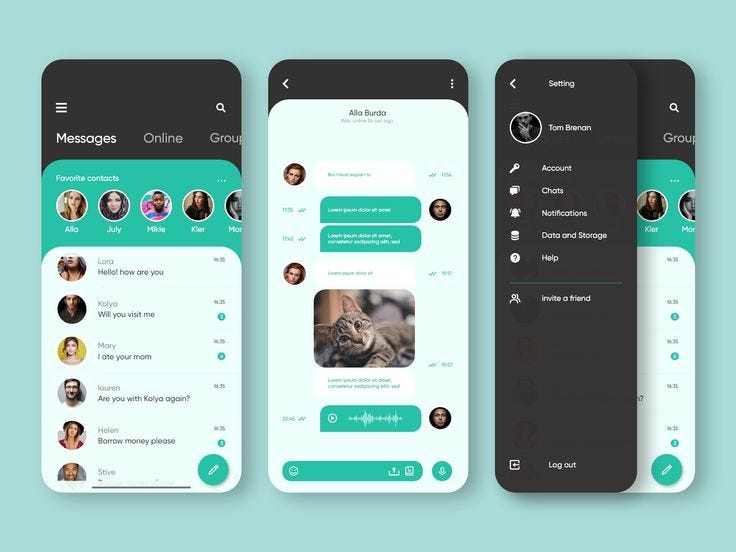 Standard WhatsApp: The Core Messaging Experience
Standard WhatsApp is the most widely used version among all official WhatsApp versions, serving as the foundation of the entire platform. Designed for everyday communication, it provides a simple, reliable, and secure way for people to stay connected with friends, family, and colleagues around the world. With billions of users globally, this version has become one of the most essential communication tools in modern digital life.
The success of standard WhatsApp lies in its ease of use and accessibility. Unlike more specialized versions such as WhatsApp Business or Beta, the standard app focuses on delivering a smooth and intuitive messaging experience without unnecessary complexity. It is available on both Android and iOS devices, making it accessible to a wide audience regardless of device preference.
Key Features of Standard WhatsApp
Standard WhatsApp includes a comprehensive set of features that cover all basic communication needs:
- Text messaging: Users can send instant messages to individuals or groups in real time. Messages are delivered quickly and reliably, even on slower internet connections.
- Voice and video calls: WhatsApp allows high-quality voice and video calls over the internet, enabling users to communicate globally without traditional phone charges.
- Group chats: Users can create groups to communicate with multiple people at once. This feature is ideal for families, friends, work teams, and communities.
- Media sharing: WhatsApp supports sharing of photos, videos, documents, voice notes, and even live location, making it a versatile communication tool.
- End-to-end encryption: One of the most important features of standard WhatsApp is its strong focus on privacy. All messages and calls are protected with end-to-end encryption, ensuring that only the sender and receiver can access the content.
These features make standard WhatsApp a complete messaging solution for personal use.
Who Should Use Standard WhatsApp?
Standard WhatsApp is ideal for a wide range of users, particularly those who need a simple and efficient way to communicate:
- Everyday users: Individuals who want a straightforward messaging app for daily communication.
- Friends and family communication: Perfect for staying in touch with loved ones through messages, calls, and shared media.
- Casual messaging: Suitable for informal conversations, social interactions, and general communication needs.
Unlike WhatsApp Business, which is tailored for professional use, the standard version is focused entirely on personal interaction. This makes it the best choice for users who do not require advanced tools or automation features.
Why Standard WhatsApp Remains Essential
Despite the introduction of other versions, standard WhatsApp continues to play a central role in the platform’s ecosystem. It provides a stable and consistent experience that users can rely on every day. Its simplicity ensures that even those with limited technical knowledge can use it بسهولة.
In addition, regular updates keep improving performance, security, and functionality, ensuring that the app remains competitive and relevant in a rapidly evolving digital landscape.
Overall, standard WhatsApp is the core messaging experience that powers global communication. Its combination of simplicity, security, and reliability makes it an essential tool for millions of users worldwide.
WhatsApp Web: Messaging on Desktop
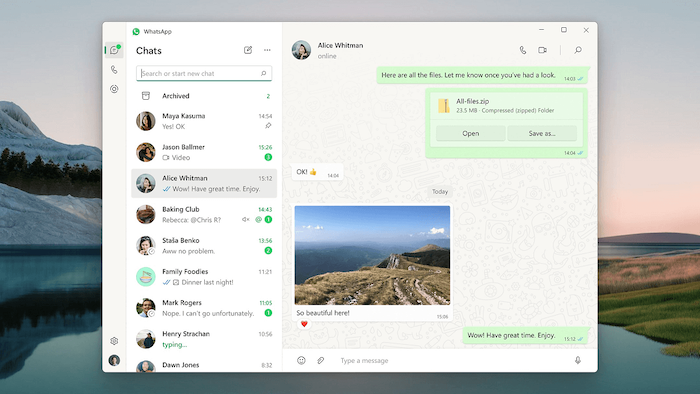 WhatsApp Web is one of the most practical and widely used official WhatsApp versions, designed to extend the messaging experience from mobile devices to desktop environments. It allows users to access their chats directly through a web browser, making it easier to communicate while working on a computer or laptop. For many users, especially professionals, WhatsApp Web has become an essential tool for daily communication and productivity.
Instead of switching constantly between a smartphone and a computer, WhatsApp Web provides a seamless way to manage conversations on a larger screen. This is particularly useful for users who spend long hours working on desktops, as it enhances efficiency and reduces distractions caused by repeatedly checking a mobile device.
How It Works
WhatsApp Web operates by syncing your mobile WhatsApp account with a browser-based interface. The setup process is simple and secure, ensuring that your data remains protected at all times.
- Syncs with your phone: WhatsApp Web does not function independently. It connects directly to your mobile device, meaning all messages sent or received are mirrored in real time.
- Requires QR code login: To access WhatsApp Web, users must scan a QR code displayed on the browser using their phone. This adds an extra layer of security and ensures that only authorized users can access the account.
- Mirrors conversations: Once connected, all chats, media, and notifications are synchronized instantly between the phone and the browser. This creates a consistent experience across devices.
In recent updates, WhatsApp has also improved multi-device support, allowing users to stay connected even when their phone is offline for short periods. This marks a significant step forward in usability and flexibility.
Advantages of WhatsApp Web
WhatsApp Web offers several key benefits that make it a preferred choice for many users:
- Easier typing: Using a physical keyboard allows for faster and more comfortable typing, especially for long messages, emails, or work-related communication.
- Better multitasking: Users can manage conversations while working on other tasks, such as writing documents, browsing the web, or attending virtual meetings.
- Ideal for work environments: WhatsApp Web is particularly useful for professionals who need to communicate with colleagues, clients, or teams throughout the day without relying on their phones.
Additionally, WhatsApp Web makes it easier to share files directly from a computer, including documents, images, and videos. This is especially beneficial for business users who frequently exchange files as part of their workflow.
Overall, WhatsApp Web enhances the functionality of the standard WhatsApp experience by providing greater convenience, efficiency, and flexibility. It bridges the gap between mobile and desktop communication, making it an essential tool in today’s digital and professional environments.
WhatsApp Business: Tools for Professionals
WhatsApp Business is one of the most powerful official WhatsApp versions, specifically designed to meet the needs of companies, entrepreneurs, and professionals who rely on efficient communication with customers. Unlike the standard version, which focuses on personal messaging, WhatsApp Business introduces a range of tools that help businesses manage interactions, build relationships, and improve customer service.
As digital communication becomes increasingly important, many small and medium-sized businesses are turning to WhatsApp Business as a primary channel for engaging with clients. Its simplicity, combined with advanced features, makes it an ideal solution for businesses that want to maintain direct, real-time communication without investing in complex systems.
Key Features of WhatsApp Business
WhatsApp Business includes several features that differentiate it from the standard version and make it particularly useful for professional use:
- Business profile: Companies can create a verified profile that includes essential information such as business name, description, address, website, and contact details. This helps build trust and credibility with customers.
- Automated replies: Businesses can set up automated messages, including greeting messages for new customers and away messages when they are unavailable. This ensures that customers always receive a response, even outside working hours.
- Catalogs and products: WhatsApp Business allows businesses to showcase their products or services through a built-in catalog feature. Customers can browse items directly within the app, making it easier to explore offerings without visiting external websites.
- Customer interaction tools: Features such as quick replies, labels, and chat organization tools help businesses manage conversations more efficiently. These tools allow users to categorize chats, prioritize responses, and streamline communication workflows.
Together, these features transform WhatsApp from a simple messaging app into a practical business communication platform.
Who Should Use WhatsApp Business?
WhatsApp Business is suitable for a wide range of users, particularly those who need direct and efficient communication with customers:
- Small businesses: Local shops, service providers, and startups can use WhatsApp Business to interact with customers, share updates, and manage inquiries.
- Online sellers: E-commerce entrepreneurs and social media sellers benefit from features like product catalogs and quick replies, which help speed up the sales process.
- Customer support teams: Businesses can use WhatsApp Business as a support channel, providing real-time assistance and improving customer satisfaction.
In addition, freelancers, consultants, and independent professionals can also use WhatsApp Business to maintain a more professional presence when communicating with clients.
Why WhatsApp Business Matters
WhatsApp Business plays a crucial role in modern communication by bridging the gap between businesses and customers. It allows companies to offer personalized, fast, and convenient interactions, which are essential in today’s competitive digital environment.
By combining ease of use with powerful features, WhatsApp Business enables organizations to improve customer engagement, increase efficiency, and build stronger relationships. For many businesses, it has become more than just a messaging app—it is a key tool for growth and success.
WhatsApp Beta: Testing the Future
 WhatsApp Beta is one of the most interesting and dynamic official WhatsApp versions, designed for users who want early access to new features before they are released to the general public. This version acts as a testing environment where WhatsApp introduces experimental tools, interface updates, and performance improvements. By participating in the beta program, users become part of the development process, helping shape the future of the platform.
Unlike the standard version, which prioritizes stability and reliability, WhatsApp Beta focuses on innovation. It allows users to explore upcoming changes, test new functionalities, and experience features that may not yet be available globally. For tech enthusiasts, developers, and curious users, this version offers a unique opportunity to stay ahead of trends in messaging technology.
How WhatsApp Beta Works
WhatsApp Beta is typically available through official app stores such as Google Play (for Android) and TestFlight (for iOS). Users must enroll in the beta program, which often has limited availability due to high demand.
Once accepted, users receive updates that include experimental features. These updates may vary in stability, as they are still being tested before public release.
Benefits of WhatsApp Beta
Using WhatsApp Beta offers several advantages, especially for users who enjoy exploring new technology:
- Try new updates first: Beta users gain early access to features such as improved messaging tools, new privacy settings, interface redesigns, and advanced functionalities before they are rolled out globally.
- Provide feedback: Users can report bugs, suggest improvements, and contribute to refining the platform. This feedback is valuable for developers and helps ensure a smoother experience for all users in the future.
- Stay ahead of changes: By using WhatsApp Beta, users become familiar with upcoming updates and trends, giving them a better understanding of how the platform is evolving.
In many cases, features introduced in the beta version later become standard across all WhatsApp versions, making beta users some of the first to experience major changes.
Risks and Limitations
While WhatsApp Beta offers exciting opportunities, it also comes with certain risks that users should consider:
- Bugs and instability: Since beta versions are still under development, they may contain errors, crashes, or performance issues that can affect usability.
- Features may change or disappear: Not all features tested in the beta version are guaranteed to be released. Some may be modified or removed entirely based on user feedback and technical performance.
- Inconsistent experience: Updates may vary in quality, and users may encounter temporary issues with messaging, notifications, or app functionality.
Because of these risks, WhatsApp Beta is best suited for users who are comfortable dealing with occasional issues and understand that the experience may not always be stable.
Is WhatsApp Beta Worth It?
For users who want a stable and predictable messaging experience, the standard WhatsApp version remains the best choice. However, for those who enjoy experimenting with new features and being part of the platform’s evolution, WhatsApp Beta is an excellent option.
Overall, WhatsApp Beta represents the future of the platform. It provides a preview of what is coming next, allowing users to explore innovation while contributing to the continuous improvement of one of the world’s most popular messaging apps.
Key Differences Between WhatsApp Versions
| Feature | Standard | Web | Business | Beta |
|---|---|---|---|---|
| Messaging | ✔️ | ✔️ | ✔️ | ✔️ |
| Business Tools | ❌ | ❌ | ✔️ | ❌ |
| Early Features | ❌ | ❌ | ❌ | ✔️ |
| Desktop Access | ❌ | ✔️ | ❌ | ✔️ |
Benefits of Understanding WhatsApp Versions
Understanding the different official WhatsApp versions can significantly improve how users communicate and manage their daily interactions. Each version is designed for a specific purpose, and knowing when and how to use them can lead to better overall efficiency.
One of the main advantages is better productivity. By using tools like WhatsApp Web or WhatsApp Business, users can streamline communication, respond faster, and handle multiple conversations more effectively, especially in work environments.
Another key benefit is improved communication. Choosing the right version ensures that messages are delivered and managed in the most suitable way, whether for personal chats, professional conversations, or customer support.
Using the right tool for each use allows users to avoid confusion and maximize the platform’s capabilities. For example, businesses can use advanced features such as automated replies and catalogs to enhance customer engagement.
Finally, users gain access to advanced features, particularly through versions like WhatsApp Business and Beta, which offer tools and innovations beyond the standard messaging experience.
Common Mistakes Users Make
Despite the availability of multiple official WhatsApp versions, many users still make common mistakes that limit their overall experience and productivity. Understanding these mistakes can help users choose the right tools and get the most out of the platform.
One of the most frequent errors is using the wrong version for business purposes. Many entrepreneurs and small business owners continue to use the standard WhatsApp instead of WhatsApp Business, missing out on valuable features such as automated replies, business profiles, and product catalogs. This can reduce efficiency and make communication with customers less professional.
Another common mistake is ignoring WhatsApp Web. Many users rely solely on their smartphones, even when working on a computer for long periods. WhatsApp Web offers a more comfortable typing experience, better multitasking, and improved workflow, especially in professional environments.
Finally, users often overlook the benefits of WhatsApp Beta. While not essential for everyone, Beta provides early access to new features and improvements. By not exploring this version, users may miss opportunities to stay ahead of changes and better understand the platform’s evolution.
Avoiding these mistakes can significantly enhance how users interact with WhatsApp in both personal and professional contexts.
Security and Privacy Across Versions
Security and privacy are fundamental elements across all official WhatsApp versions, ensuring that users can communicate with confidence regardless of which platform they use. Whether you are using standard WhatsApp, WhatsApp Web, WhatsApp Business, or WhatsApp Beta, the core security framework remains consistent and robust.
One of the most important features is end-to-end encryption, which protects messages, calls, photos, and videos from being accessed by unauthorized parties. This means that only the sender and the recipient can read or listen to the content, not even WhatsApp itself. This level of encryption has become a key standard in modern messaging applications.
In addition to encryption, WhatsApp offers secure messaging protocols that help protect data during transmission. These protocols ensure that conversations remain private, even when using public or shared networks.
WhatsApp also provides a variety of privacy controls that allow users to manage their visibility and security settings. These include options to control who can see your profile photo, status, last seen, and online activity. Users can also enable two-step verification for an extra layer of account protection.
Together, these features make all official WhatsApp versions secure, reliable, and suitable for both personal and professional communication.
For users focused on privacy, WhatsApp continues to introduce powerful security tools. One of the most important features is Locked Chats, which allows you to protect sensitive conversations using biometrics or passcodes. Learn how to secure your messages effectively in this complete guide:
https://tutorialnest.co.za/locked-chats-whatsapp/
The Future of WhatsApp Ecosystem
The future of the WhatsApp ecosystem is closely tied to ongoing technological innovation and the evolving needs of users worldwide. As one of the most widely used messaging platforms, WhatsApp continues to expand its capabilities beyond simple communication, positioning itself as a central hub for both personal and professional interactions.
One of the key developments is AI integration, which is expected to enhance features such as smart replies, automated customer support, and improved message organization. Artificial intelligence will play a major role in making conversations more efficient and personalized.
Another important direction is business expansion. WhatsApp Business is likely to introduce more advanced tools, enabling companies to manage customer relationships, sales, and support directly within the app.
Finally, cross-platform improvements will continue to ensure a seamless experience across smartphones, tablets, and desktops. These enhancements will make communication more flexible, consistent, and accessible across all devices.
Learn more about WhatsApp: WhatsApp Site Official↗️
Executive Summary
The four official WhatsApp versions each serve distinct purposes, ranging from personal messaging to business communication and feature testing. Understanding these official WhatsApp versions helps users improve productivity, enhance communication, and select the right tools for their specific needs, ensuring a more efficient and optimized messaging experience across devices.